
 Clock
Clock
 Memory
 Control
ALU Primer
The Arithmetic Logic Unit (ALU) is a combinational circuit which performs arithmetic, logic, and bitwise operations on binary numbers; and it is an indispensable component within a CPU!
Arithmetic Operations
A simple ALU usually implements addition and subtraction directly in combinational hardware. Multiplication and division can also be built in hardware, but in small educational designs they are often handled through repeated addition, subtraction, and shifts. For instance, in multiplication, a common method involves repeated addition and bit shifts, which can be time-consuming. The advantage of this approach is that it requires very little hardware, but it trades speed for simpler circuitry. Such a trade-off can be acceptable, as the saved space can be repurposed for other functionalities, whether on a silicon chip or a PCB. However, modern CPUs often include more advanced ALUs with dedicated hardware for multiplication, which speeds up these operations far beyond the basic repeated-addition approach. In the same vein, division, though often more complex, can use specialized methods that go beyond repeated subtraction.
Logical Operations
Logical operations such as AND, OR, and NOT let the CPU work directly with individual bits. They help compare test conditions, mask specific bits, and decide how data should move through a program.
Bit-Shifting Operations
The ALU can shift bits to the left or right, which changes the position of each bit inside a value. A left shift can act like multiplication by powers of two, while a right shift can act like division by powers of two. Shifts also help align, or modify specific bits during low-level operations.
Because the SAP-1 is an introductory architecture, it contains an ALU capable of only addition and subtraction. These two operations are enough to build many other arithmetic routines in software, given enough time and memory.
In addition to arithmetic operations, my ALU can perform left shift (LSL) and right shift (LSR), along with Boolean operations AND, OR, and XOR, which gives it more flexibility across different tasks.
Logical operations are straightforward, as they’re direct outputs of their respective gates.
For instance, to apply a bitwise AND operation on two 4-bit words, you pass each corresponding pair of bits into four separate two-input AND gates. The collective output of these four parallel gates is then read together as the final 4-bit word result. This is different from using a single 8-input AND gate, which would evaluate all eight bits simultaneously to produce a single 1-bit output rather than a 4-bit word.
Arithmetic and shift operations, on the other hand, are more interesting hardware-wise.
Arithmetic Operations
Addition (ADD)
Binary addition is very similar to decimal addition. For example:
(10) +  (5) = (15)
1010 + 0101 = 1111

carry           0000
Number A        1010
Number B      + 0101
               ------
                1111
The process is as direct as an addition on each corresponding pair of bits. If the sum is 2 (10 in binary) or more, you carry over a bit to the next left column.
For example:
 (9) +  (7) = (16)
1001 + 0111 = 10000

carry         01110
Number A       1001
Number B     + 0111
              ------
              10000
In the example above, a carry is generated because the sum of the rightmost bits is 10 in binary, or 2 in decimal. The 0 is placed in the result, and the 1 is carried over to the next column. The same happens for the second column from the right, and so forth.
In the final operation (fourth column from the right), a 1 carries outside the 4-bit range in the result row. Consequently, the ALU’s Carry Flag (C) is set to 1 to show a carry occurred.
The carry flag becomes particularly relevant in multi-precision arithmetic, where operations involve numbers that are too large to be accommodated within the standard bit-size of the ALU.
With this basic addition refresher out of the way, let’s look at how the CPU manages this task internally. To perform additions, the ALU uses a circuit called a “Full Adder”. We’ll see how it works, but before, let’s take a look at its building block, the “Half Adder”.
Half Adder
A half adder is a binary adder that operates on two binary digits and produces two outputs: sum and carry. The name “half” comes from the missing carry input from a previous bit position, which multi-bit addition requires. That limitation restricts its use.

In this circuit, the sum is derived from the XOR gate’s output, while the AND gate’s output determines the carry.
Full Adder
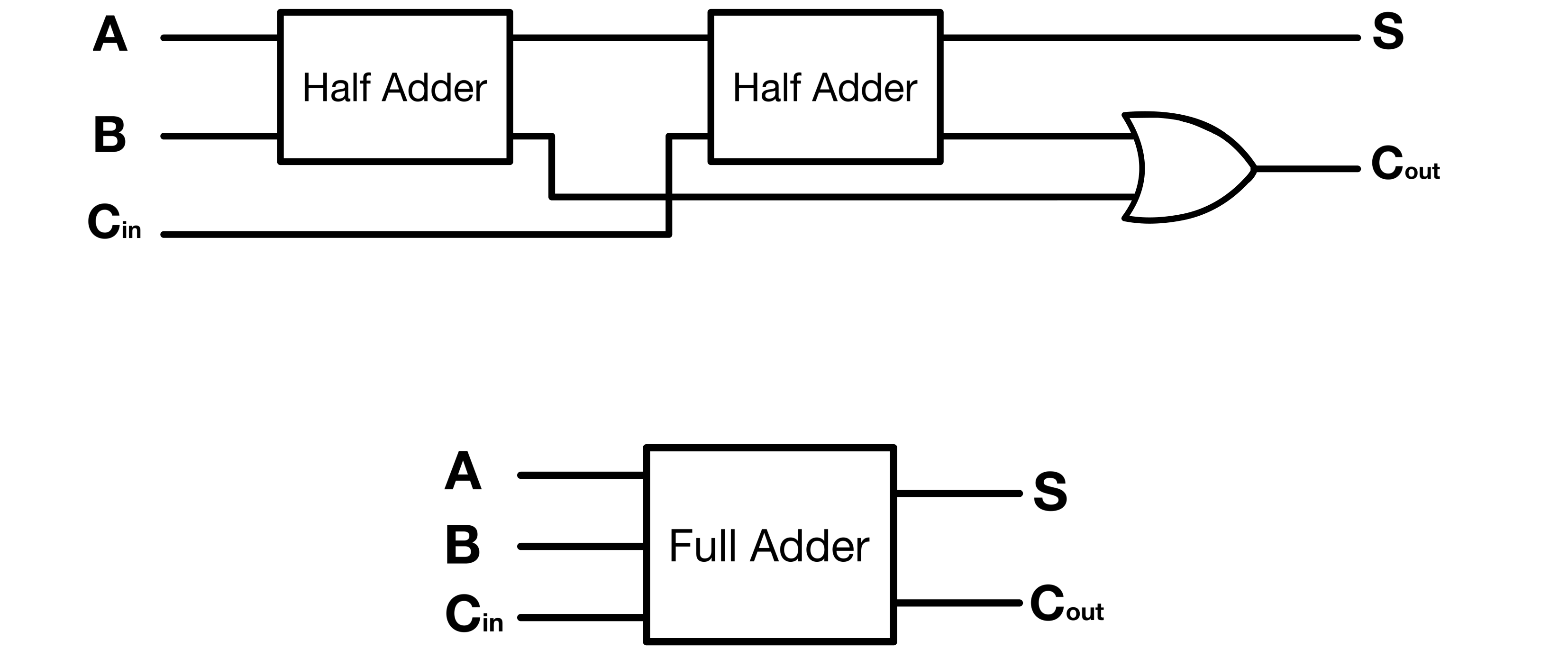
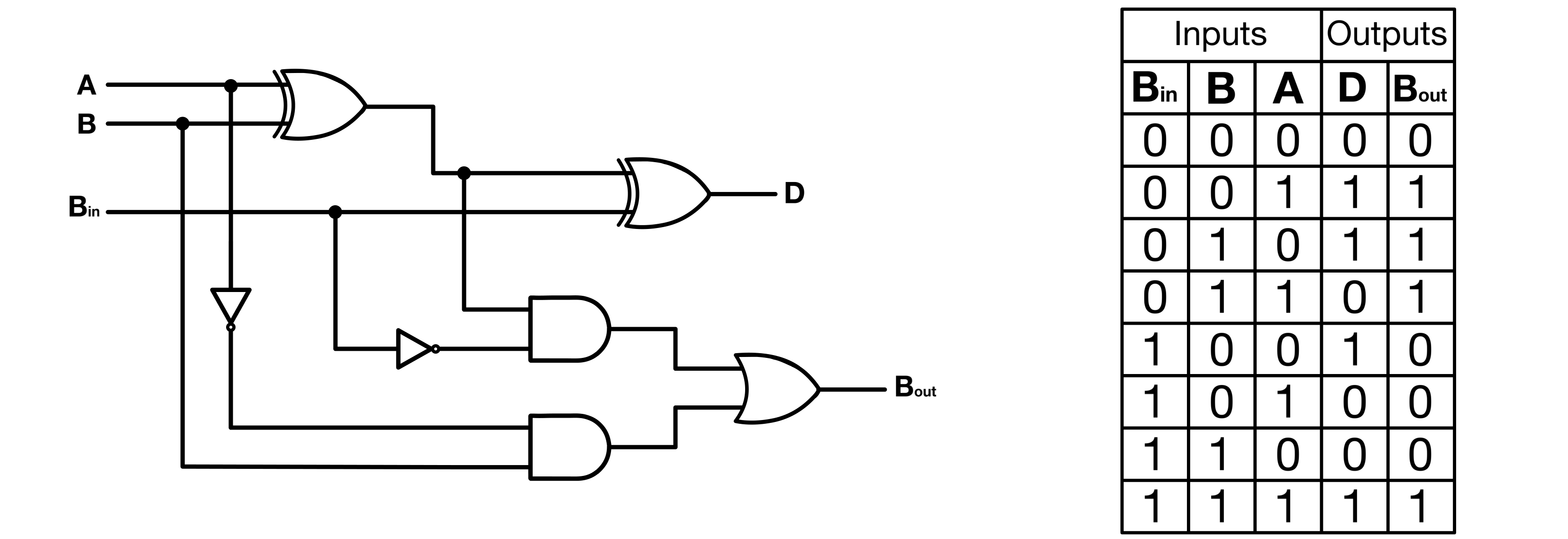
A full adder extends the half adder by adding three bits: two input bits and a carry bit from the previous bit position. The carry input removes the main limitation of the half adder, which cannot process carry from earlier additions.
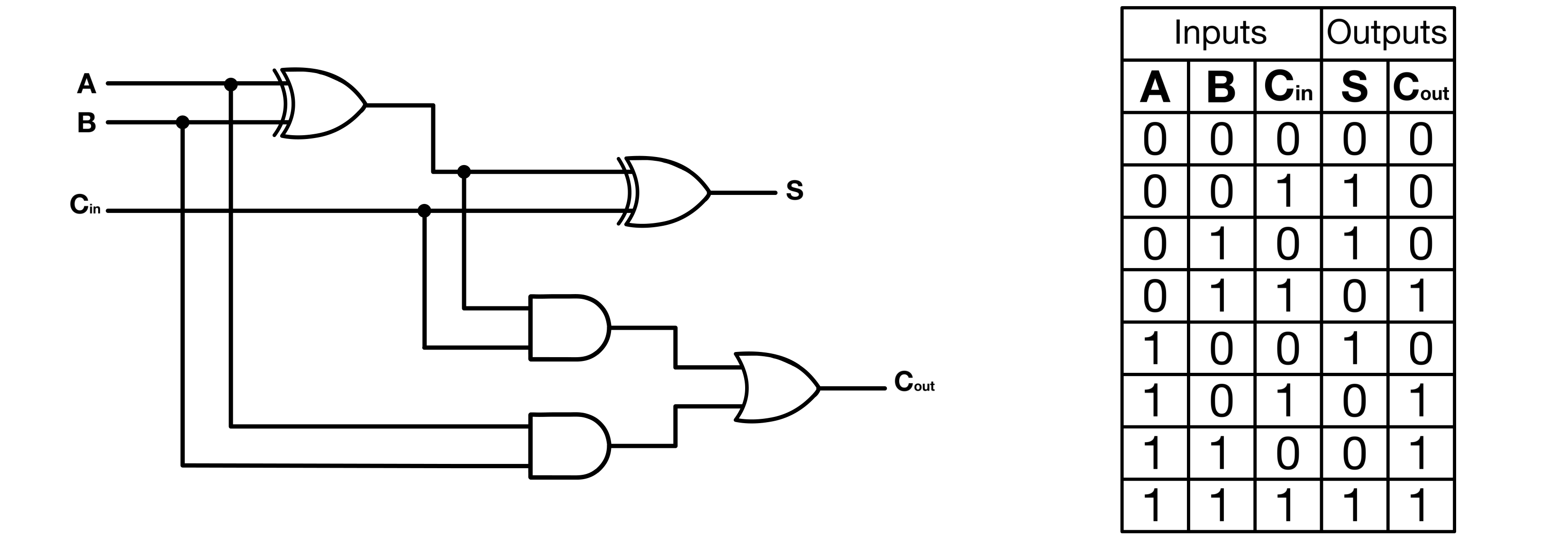
In practice, you can make a full adder with two half adders. One half adder processes the two input bits, while the other accepts the carry from the first half adder to provide the final sum.
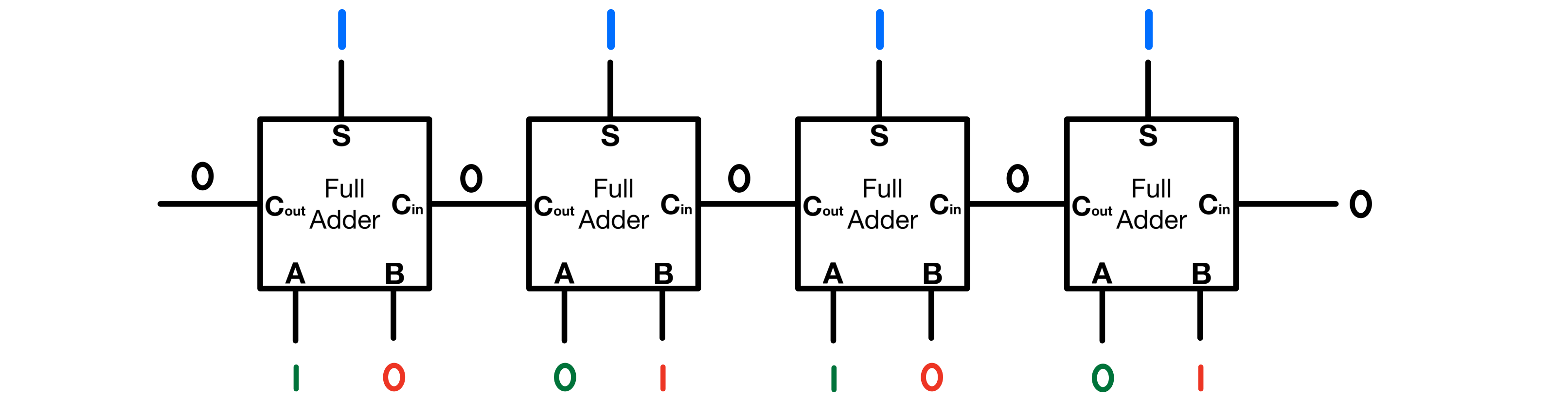
Going back to the two previous addition examples; a full adder would handle them as follows:
(10) + (5) = (15)
1010 + 0101 = 1111
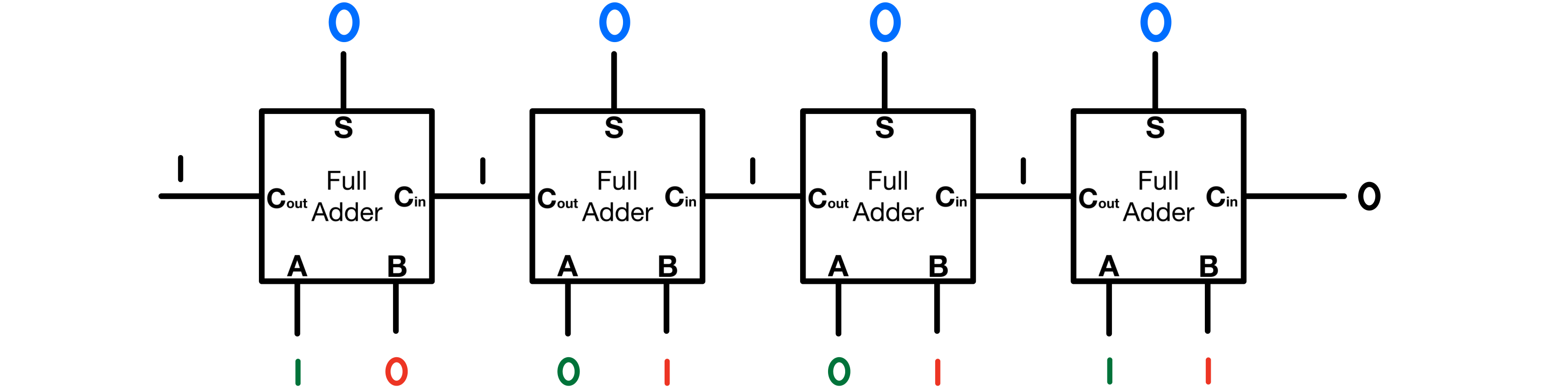
And
(9) + (7) = (16)
1001 + 0111 = (1)0000
Subtraction (SUB)
Subtraction can be a bit more complex than addition. At its core, the representation of a number, whether in decimal, binary, or hex, serves as an abstraction of an actual quantity. For instance, representing four apples in words can be done as “4 apples”, “0b100 apples”, or “0x4 apples”. Regardless of how we represent/write it, in reality, we still refer to 🍏🍏🍏🍏.
As mentioned in the Basic Definitions And References, binary is the language of computers, not necessarily because it is the best numerical system, but because it mirrors the inherent ON/OFF nature of transistors, the fundamental components of digital electronics.
Computers “speak” binary because their basic hardware operates in binary.
When dealing with the concept of negative numbers, we’re adding another layer of abstraction. One way to think about negative numbers is as the “absence of a quantity” (I can imagine math and philosophy enthusiasts facepalming at this definition, but hopefully it makes enough sense). The challenge then becomes: How do we represent this added abstraction to a mindless electronic circuit?
There are typically three major ways to represent negative numbers in binary: sign-magnitude, one’s complement, and two’s complement. In all three systems, the leftmost bit is the sign bit, 0 for positive numbers and 1 for negative numbers.
| Decimal | Signed Magnitude | Signed One’s Complement | Signed Two’s Complement |
|---|---|---|---|
| +7 | 0111 | 0111 | 0111 |
| +6 | 0110 | 0110 | 0110 |
| +5 | 0101 | 0101 | 0101 |
| +4 | 0100 | 0100 | 0100 |
| +3 | 0011 | 0011 | 0011 |
| +2 | 0010 | 0010 | 0010 |
| +1 | 0001 | 0001 | 0001 |
| 0 | 0000 | 0000 | 0000 |
| -0 | 1000 | 1111 | - |
| -1 | 1001 | 1110 | 1111 |
| -2 | 1010 | 1101 | 1110 |
| -3 | 1011 | 1100 | 1101 |
| -4 | 1100 | 1011 | 1100 |
| -5 | 1101 | 1010 | 1011 |
| -6 | 1110 | 1001 | 1010 |
| -7 | 1111 | 1000 | 1001 |
Table 1: Decimal, Sign-magnitude, One’s complement, and Two’s complement Representation of 4-bit Signed Binary Numbers
Note: A 4-bit two’s complement number can also represent -8 as 1000. That value is not shown in the table because sign-magnitude and one’s complement do not have an equivalent -8 representation in 4 bits.
Sign-Magnitude
In the sign-magnitude system, the remaining bits represent the magnitude of the number. So, 0101 would represent +5, and 1101 would represent -5. It is straightforward but has a significant drawback: there are two representations of zero, 0000 and 1000, which can complicate calculations.
One’s Complement
Then there’s one’s complement. It flips all the bits of a positive number to get the negative equivalent. But like sign-magnitude, one’s complement also has positive and negative zeros, which can be problematic.
Two’s Complement
This brings us to the two’s complement system, the most widely used. It not only solves the negative zero issue but also makes arithmetic operations align seamlessly. With two’s complement, you flip the bits and add 1 to get the negative of a number. The reason it works may not seem intuitive at first; it definitely did not to me when I first learned about binary. From a hardware perspective, though, the process is straightforward because it requires only minor changes to the adder circuitry.
I think the “Why Inversion and Adding One Works” chapter of this article does a great job at explaining the mathematical intuition behind complements.
Reminder: minuend - subtrahend = difference
Again, with two’s complement, you simply flip the bits of the subtrahend and add 1 to it, to get the negative representation of a number. And it just now becomes a matter of adding the transformed number to the minuend. A binary subtractor follows exactly that process.
Adder/Subtractor Circuit
An adder/subtractor circuit reuses the same adder hardware for both addition and subtraction. In subtraction mode, the circuit inverts the second operand and adds 1, which turns the operation into a two’s-complement addition.
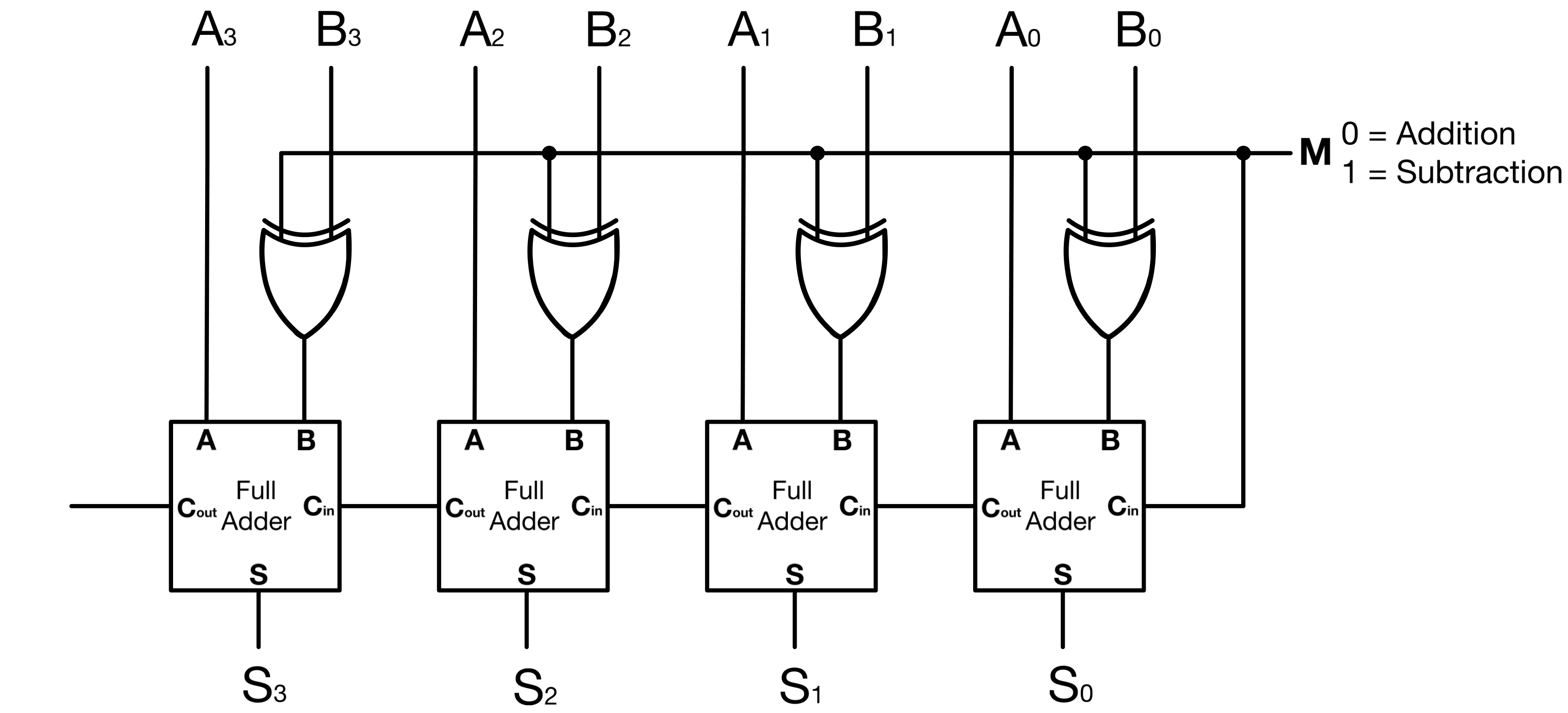
This circuit serves as a subtractor when M = 1 and as an adder when M = 0. The subtractor takes the 2’s complement of B (by first reversing all bits and adding M = 1) and adds it to A. You convert an adder to a subtractor simply by placing an XOR gate at each bit of the adder’s second input.
Two’s Complement Subtraction With an Adder/Subtractor
For the sake of simplicity, let’s consider a 4-bit ALU subtracting 0001(1) from 0110(6). First let’s compute the subtraction “by hand”:
(6)  - (1) =  (5)
0110 - 0001 = 0101

borrow          0001
Number A        0110
Number B      - 0001
               ------
                0101
The answer just makes sense because we understand the meaning of the minus sign; but so far our hardware can only do addition. Subtracting a positive number B, from any other number A (A-B) is the same as adding (-B) to A ( A + (-B)). Two’s complement makes it possible to perform subtraction by adding the negative representation of the subtrahend. The way I think of it is that we never “subtract a positive number from”, but always “add a negative number to”.
Going with the example above:
(6)  -  (1) =  (5)
0110 - 0001 = 0101
First, let’s convert both unsigned numbers to their two’s complement:
6 is 0110 and 1 is 0001.
The Signed Magnitude representation of +6 is similar to its Two’s Complement representation.
To get -1, first we get the one’s complement of 1 (flip all bits):
1110
and add 1
1110
+  1
-----
1111
Now in two’s complement,
(6) - (1) (6) + (-1)
0110 - 0001 becomes: 0110 + 1111
carry      11101
(6)         0110
(-1)      + 1111
           ------
            0101
0110 - 0001 = 0101
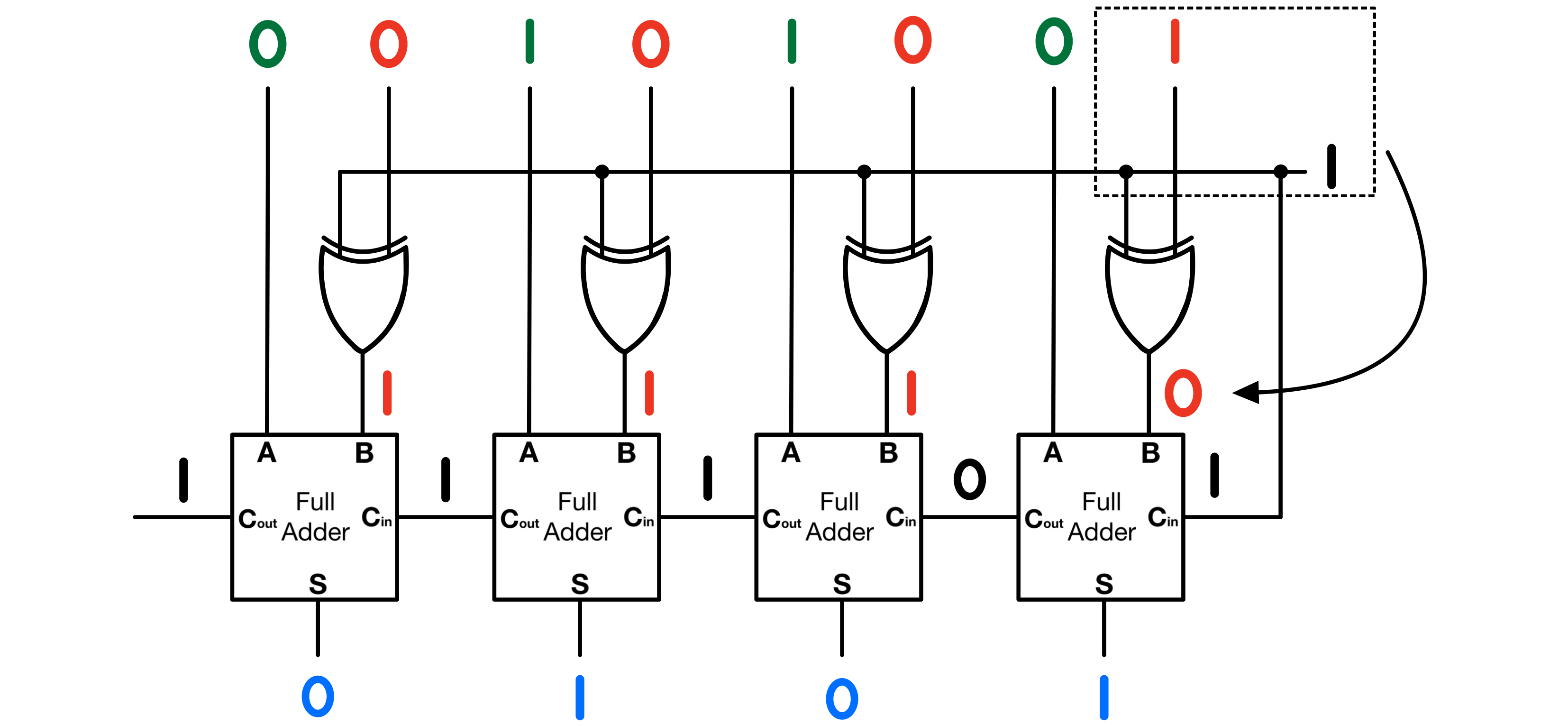
The result is the same as a “normal” subtraction, the difference here is the subtraction process in this case can easily be implemented in hardware.
Shift Operations
Shift operations in an ALU simply move bits to the left or right in a binary number. They are often used for multiplication and division and can help to adjust the value of a binary number or change its structure for other logical operations.
Left Shift (Logical Shift Left - LSL)
A left shift operation moves all bits in a binary number a certain number of places to the left. Empty positions on the right are filled with zeros. For unsigned fixed-width values, each left shift effectively multiplies the number by 2 as long as no significant bit is shifted out of range.
Example: Original: 0101 (5) Left Shift: 1010 (10)
Right Shift (Logical Shift Right - LSR)
A logical right shift moves all bits a certain number of places to the right and fills the empty positions on the left with zeros. For unsigned values, each right shift roughly divides the number by 2, and discards any remainder.
Example: Original: 1010 (10) Right Shift: 0101 (5)
Arithmetic Shifts
Arithmetic shifts are used with signed binary numbers. When performing an arithmetic right shift, the empty positions on the left are filled with the value of the sign bit to keep the sign of the number the same. Arithmetic left shift is bit-level equivalent to logical left shift, but signed overflow can still occur if the sign bit changes unexpectedly.
Rotate
Rotate operations shift bits around to the other side of the binary number when they fall off one end. It can be to the left or right. For example, with a rotate right operation, a bit that falls off the right end will reappear on the left. Rotate operations are mainly useful for bit manipulation. The decimal value after a rotate depends on how the resulting bit pattern is interpreted.
Example for Rotate Right: Original: 1011 (11) Rotate Right: 1101 (13)