
 Clock
Clock
 Memory
 Control
SPI and Port Selector Modules
The previous page introduced SPI and the SD-card command flow at a protocol level. This page focuses on the actual SPI module in my build: how the CPU drives MOSI, SCLK, and chip-select lines, and how it reads MISO back from the selected peripheral.
The SPI module is intentionally simple. Instead of using a dedicated SPI controller IC, the CPU drives the SPI pins through normal I/O logic and assembly routines. The design is slower than a hardware SPI peripheral in a microcontroller, but the bus remains easy to understand and debug on a breadboard.
Role in the CPU
The SPI module adds external serial communication to the CPU. In the current build, the important peripheral is the microSD card. The same SPI bus is also intended to support a BLE SPI module later.
At a high level, the module has three jobs:
1. Let the CPU write SPI output lines:
   MOSI, SCLK, SD-card CS, and BLE CS.

2. Let the CPU read SPI input lines:
   mainly MISO from the selected peripheral.

3. Let assembly routines generate SPI byte transfers
   by toggling the output lines one bit at a time.
The hardware stays small, but the tradeoff is that every SPI byte requires a software loop.
Port Selector
The SPI bus is accessed through the CPU’s port selector circuit. Instead of giving every I/O device its own control lines, the CPU selects a port and then performs an input or output operation through that selected path.
The port selector is made out of a 4-bit register and a decoder. The register stores the selected port number, and the decoder turns that value into individual enable or write signals for the attached I/O devices.
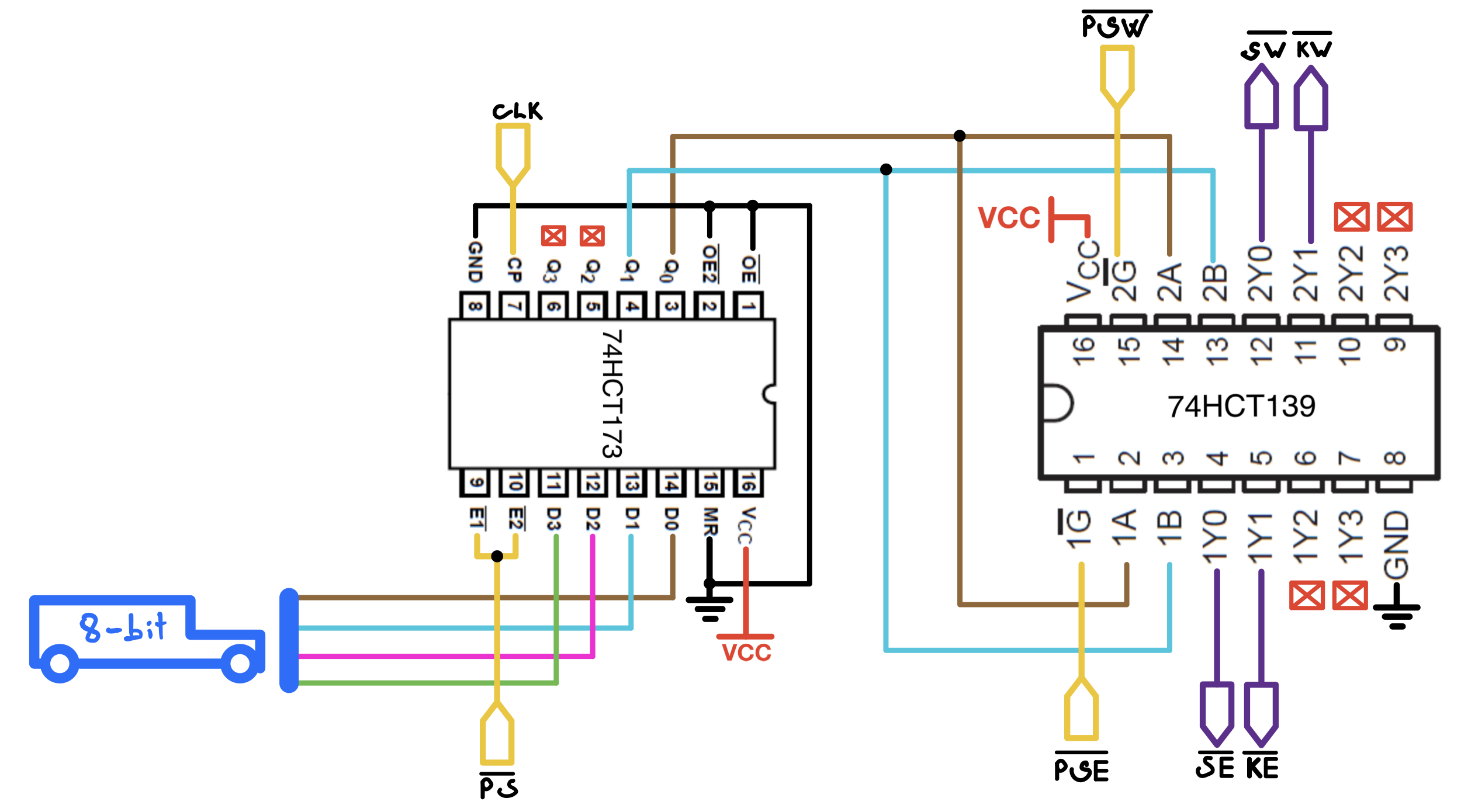
In this part of the CPU, the involved control lines are: (5):
- |← _PS Port Select in
- |← _PSW Port Selector Write
- |← _PSE Port Selector Enable
- |→ _SW SPI Write
- |→ _SE SPI Enable
_PS loads the selected port value into the port selector register. Once the port value is stored, _PSW is used when the CPU writes to the selected port, and _PSE is used when the selected port drives data back onto the CPU bus.
For the SPI module, the SPI port is selected through this same mechanism. Once the SPI port is selected, writes update the SPI output register, which controls MOSI, SCLK, SD-card chip select, and BLE chip select. Reads enable the SPI input path, so the CPU can read MISO.
The CPU only needs to select the SPI port and then perform a normal input or output operation; the port selector handles which external circuit is connected for that transfer.
SPI Signals
The SPI bus uses the usual SPI signal names:
MOSI    CPU -> peripheral data
MISO    peripheral -> CPU data
SCLK    serial clock generated by the CPU
CS_SD   SD-card chip select
CS_BLE  BLE-module chip select
The SD card and BLE module share MOSI, MISO, and SCLK. Each device has its own chip-select line, so only one device should be active at a time.
Chip select is active low for the SD card and BLE module. That means the selected device has its CS line pulled low, while inactive devices have their CS lines held high.
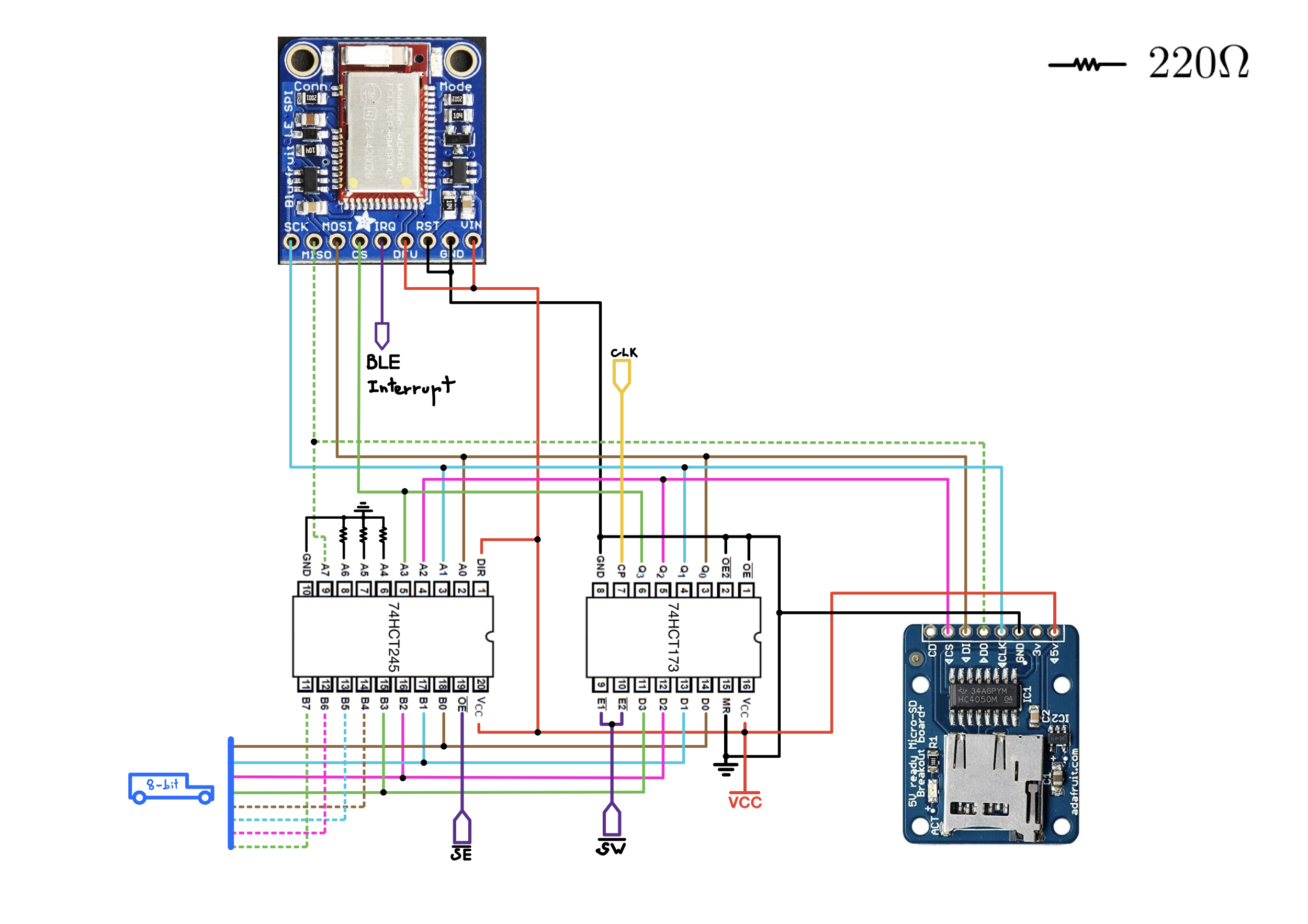
Control lines involved (2):
- |← _SW SPI Write
- |← _SE SPI Enable
Output Side
The CPU drives the SPI output lines through an output register connected to the data bus. The assembly code writes a value to the SPI port, and each bit of that value controls one SPI line.
A simplified bit assignment is:
bit 0 -> MOSI
bit 1 -> SCLK
bit 2 -> CS_SD
bit 3 -> CS_BLE
bit 7 -> MISO
The exact constant names in assembly are used to make this easier to read:
MOSI        = 0b00000001
SCLK        = 0b00000010
SD_CARD_CS  = 0b00000100
BLE_CS      = 0b00001000
MISO        = 0b10000000
With this mapping, the CPU can set or clear SPI lines by modifying bits in the output value and writing the result to the SPI port.
For example, setting SCLK high means ORing the current SPI output value with the SCLK bit. Clearing SCLK means ANDing the current output value with the inverse of the SCLK bit.
Input Side
MISO is read through the CPU input path. During a read, the CPU samples the SPI input state and extracts MISO from bit 7 of the SPI port value.
The SPI module is therefore not a full hardware SPI interface. The CPU performs the transfer itself:
set or clear MOSI
raise SCLK
sample MISO
lower SCLK
repeat for 8 bits
That sequence is enough for SD-card communication because SPI mode 0 samples data on the rising edge of SCLK and shifts data around the opposite edge.
Device Selection
Before talking to a peripheral, the CPU must select it by pulling its chip-select line low.
For the SD card:
CS_SD = 0  selected
CS_SD = 1  deselected
For the BLE SPI module:
CS_BLE = 0  selected
CS_BLE = 1  deselected
The safe idle state is to deselect every SPI peripheral:
CS_SD  = 1
CS_BLE = 1
SCLK   = 0
MOSI   = 1
Holding MOSI high and sending dummy 0xFF bytes is useful during SD-card power-up and when generating clocks while reading.
Writing One SPI Byte
To write one byte, the CPU sends the most significant bit first. The assembly routine keeps a copy of the byte in a register, shifts it left, and uses the carry flag to decide whether MOSI should be high or low.
A simplified version of the write loop is:
repeat 8 times:
    shift the next output bit into carry

    if carry = 1:
        set MOSI
    else:
        clear MOSI

    pulse SCLK high
    bring SCLK low
That’s called bit-banging: The CPU manually creates every SPI clock edge in software.
The benefit is that the routine is easy to adapt and inspect. The downside is that the maximum SPI speed is limited by the CPU clock and the number of micro-operations needed for each bit.
Reading One SPI Byte
Reading is similar, except the CPU also samples MISO on each clock pulse.
A simplified version of the read loop is:
received = 0

repeat 8 times:
    raise SCLK
    read the SPI input state
    shift received left by one bit
    move sampled MISO into carry
    add carry into the low bit of received
    lower SCLK
In SPI, reads still require clocks. For that reason, a read operation often transmits dummy 1s on MOSI while the peripheral shifts useful data back on MISO.
For the SD card, this is especially important, because after sending a command, the CPU may have to keep sending dummy clocks until the card produces a response token.
SD-Card Power-Up Clocks
The SD card has a special power-up requirement before it accepts SPI commands. After power is stable, the host must provide at least 74 clock pulses while chip select is high.
The CPU handles this by sending ten dummy bytes while the SD card is deselected:
10 bytes x 8 clocks/byte = 80 clocks
That gives the card enough clocks to enter the proper idle condition before CMD0 is sent.
Relationship to the SD Routines
The SPI module itself does not know about SD commands. It only knows how to move bytes over MOSI and MISO.
The SD-card routines build on top of the SPI byte routines:
SPI_WRITE_BYTE
SPI_READ_BYTE
        |
        v
SD command send routine
        |
        v
CMD0, CMD8, CMD55, ACMD41, CMD17
        |
        v
SD block read into RAM
The SD-card layer sits above that and handles SD-specific details like command frames, and 512-byte block reads.
Debugging Notes
Although SD-card initialization guidelines usually recommend a startup clock in the 100kHz to 400kHz range, my card still entered SPI mode at my CPU’s lowest clock speed, around 17kHz(Which means SCKL was even slower due to bit banging). At that speed, the command sequence and response bytes were much easier to inspect during debugging. I’d sometimes just record the CPU running with my phone and debug the registers contents in slow mo. I recommend starting at the slowest clock speed first, confirm that CMD0 and the initialization sequence behave correctly, and only then increase the clock speed.
For bring-up, I found it useful to test the SPI byte routines first, then the SD command responses, and only then the full block-read path.
Useful signals to check are:
CS_SD goes low only when the SD card is selected.
SCLK idles low in SPI mode 0.
MOSI changes before the rising clock edge.
MISO is sampled while SCLK is high.
Inactive SPI devices keep their CS lines high.
ICs
2x 74HCT173, 4-Bit D-type Registers with tri-state Outputs, (Digikey, Datasheet)
1x 74HCT139 Dual 2-Line To 4-Line Decoders/Demultiplexers (Digikey, Datasheet)
1x 74HCT245, Octal Bus Transceivers With 3-State Outputs, (Digikey, Datasheet)
1x MicroSD card breakout board (Adafruit)
1x Bluefruit LE SPI Friend, Bluetooth Low Energy module (Adafruit)