
 Clock
Clock
 Memory
 Control
SPI & SD Primer
The next major I/O interface in my CPU is the SPI bus. I use it mainly for the SD card interface, but the same bus can also support other SPI devices. The SD card module is one of the most important because it gives the computer a practical way to load larger programs without constantly burning ROMs. This page explains the SD card command format and the basic initialization sequence needed before the CPU can read blocks from the card.
SPI Basics
SPI stands for Serial Peripheral Interface and is a widely-adopted serial bus communication protocol, first developed by Motorola in the late 1980s. It is primarily used for short-distance, synchronous serial communication.
A basic SPI connection uses four signals:
- MOSI: Master Out, Slave In. Data from the controller to the peripheral.
- MISO: Master In, Slave Out. Data from the peripheral to the controller.
- SCLK: Serial clock, generated by the controller.
- CS: Chip select. A peripheral responds when its chip-select line is asserted.
The controller can share MOSI, MISO, and SCLK across multiple peripherals. Each peripheral then gets its own chip-select line.
Data transfer is Byte-Oriented in SPI Mode, this means that data is sent and received one byte at a time over SPI. Take this with a grain of salt, but the way I believe bytes are internally handled within slave SPI memory controllers is through a combination of a shift and buffer register, just like the Master device would.
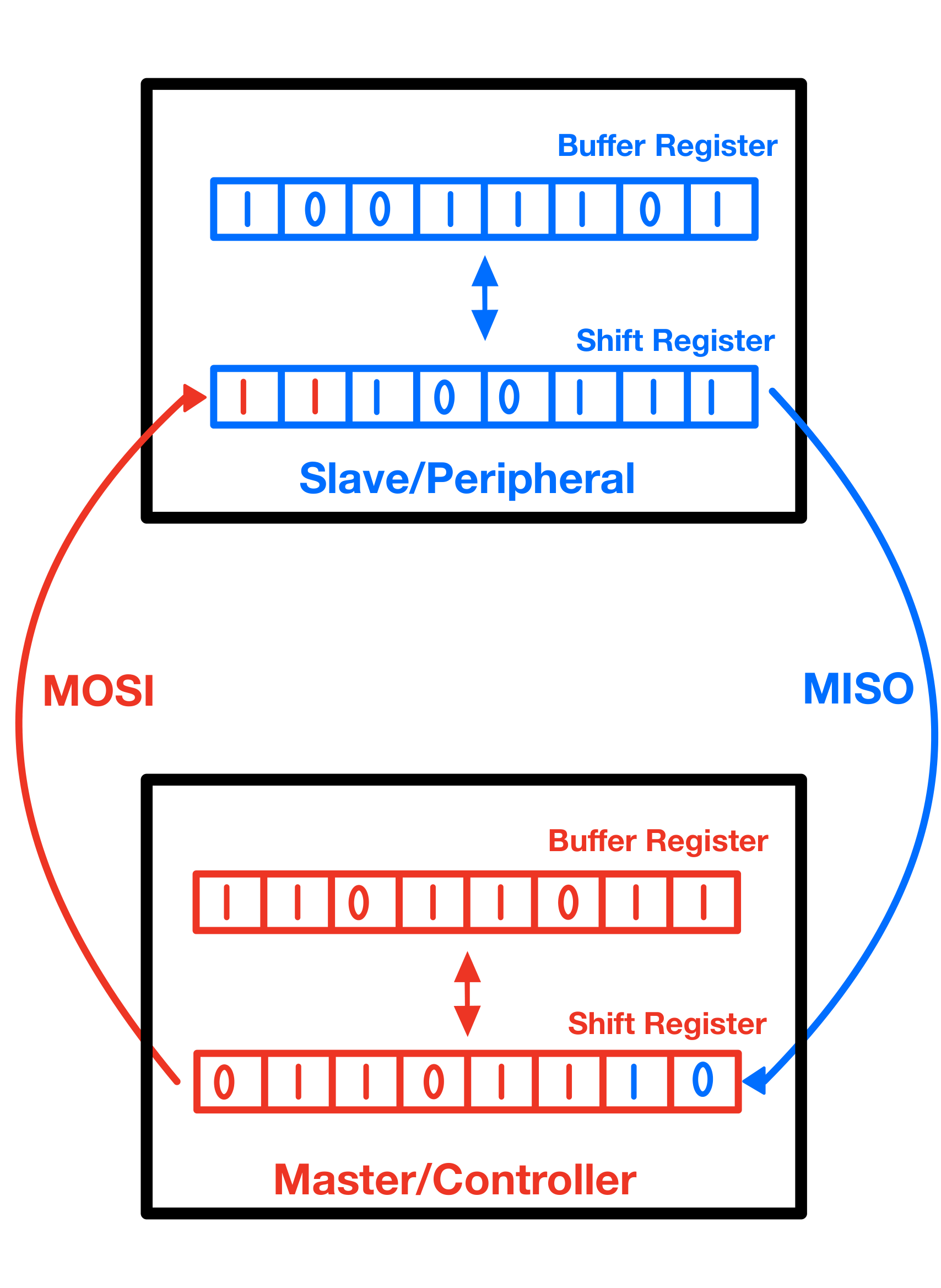
The exact internal design of an SD card controller is, of course, more complex, but the shift-register model is useful for understanding what the SPI bus does electrically.
SPI Mode
SPI is a widely used, but loosely defined standard. It doesn’t enforce a single way of handling the clock signal and data sampling. The clock polarity (CPOL) and clock phase (CPHA) determine how the master and slave devices on the SPI bus interpret the clock signal and when they sample or shift out data.
- CPOL = 0: The clock line is low when idle.
CPOL = 1: The clock line is high when idle.
- CPHA = 0: Data is sampled on the leading edge and shifted on the trailing edge of the clock signal.
- For CPOL = 0, the leading edge is the rising edge.
- For CPOL = 1, the leading edge is the falling edge.
- CPHA = 1: Data is sampled on the trailing edge and shifted on the leading edge of the clock signal.
- For CPOL = 0, the trailing edge is the falling edge.
- For CPOL = 1, the trailing edge is the rising edge.
The combination of CPOL and CPHA results in four possible SPI modes:
- Mode 0 (CPOL = 0, CPHA = 0): Idle low, sample on rising edge.
- Mode 1 (CPOL = 0, CPHA = 1): Idle low, sample on falling edge.
- Mode 2 (CPOL = 1, CPHA = 0): Idle high, sample on falling edge.
- Mode 3 (CPOL = 1, CPHA = 1): Idle high, sample on rising edge.
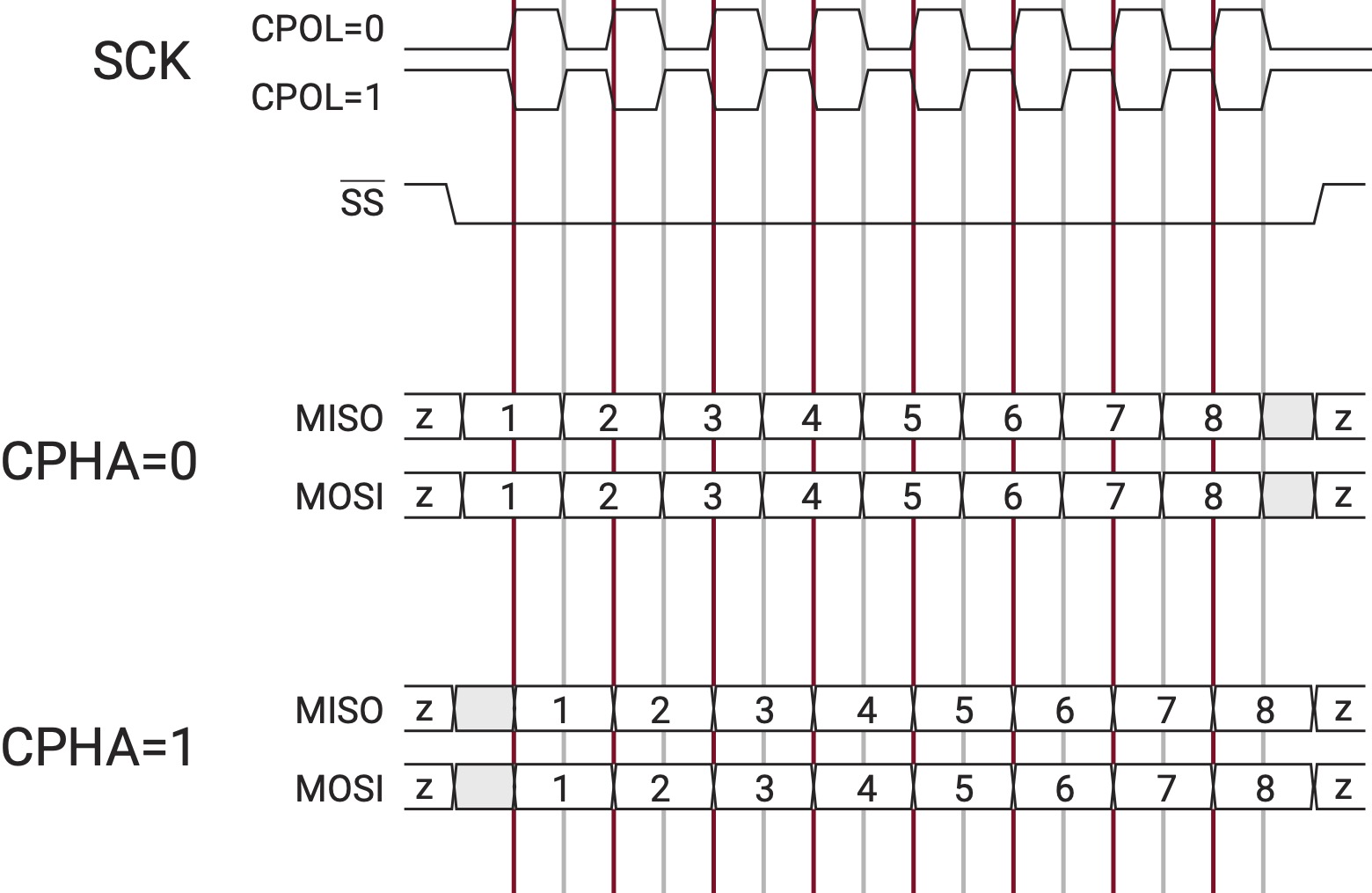
The SD card interface in this build uses SPI mode 0:
CPOL = 0
CPHA = 0
SD Cards in SPI Mode
SD cards normally power up in their native SD-bus mode. The Secure Digital (SD) protocol is a standardized protocol for memory cards developed by the SD Association (SDA). SPI mode is a compatibility mode, and the host has to follow the proper power-up sequence before sending normal commands.
The basic startup flow is:
Power up the card
Wait at least 1 ms
Hold CS high
Send at least 74 clock pulses
Assert CS low
Send CMD0
Continue with SD initialization commands
In software, it is common to send ten bytes of 0xFF while CS is high. Ten bytes produce 80 clock pulses, which satisfies the “at least 74 clocks” requirement.
The SD card clock should be slow during initialization. After the card is initialized, the SPI clock can be increased if the hardware supports it.
Types of SD Cards:
SD cards come in various types, including:
- SD(or SDSC): Standard SD cards with a capacity of 2GB and under.
- SDHC: High Capacity SD cards with capacities ranging from more than 2GB to up to 32GB.
- SXDC: Extended Capacity SD cards with capacities exceeding 32GB, up to 2TB.
- SDUC: Ultra Capacity SD cards with capacities greater than 2TB, up to 128TB.
(Note: As far as I am aware, SDUC does not support SPI.)
I use a 32 GB microSDHC card for mass storage in this build.
SD Command Format
An SD command is a request sent from the host to the card. Commands are identified by names like CMD0, CMD8, and CMD17. Each command tells the card to perform a specific operation: reset into idle state, report voltage/card-version information, read a block of data, and so on.
Most commands use the CMD prefix and belong to the main SD command set. Application-specific commands use the ACMD prefix and belong to a secondary command set defined by the SD standard. The name can be confusing as an application-specific command is not a custom command made by the programmer. The card already knows what those commands mean. The difference is that the host must first send CMD55, which tells the card to decode the next command as an ACMD instead of a normal CMD.
For example, ACMD41 is a standard SD command used during initialization, but it is still called application-specific because it lives in the ACMD command set. The host sends CMD55 first, then sends ACMD41 to continue the initialization process.
SD commands in SPI mode use a 6-byte frame:
Byte 0: command index
Byte 1: argument[31:24]
Byte 2: argument[23:16]
Byte 3: argument[15:8]
Byte 4: argument[7:0]
Byte 5: CRC7 plus end bit
The command index byte starts with a fixed 01 prefix, followed by the 6-bit command number. In other words, the command byte is made by OR-ing the command number with 0x40:
command byte = 0b01000000 | command_number
or:
command byte = 0x40 | command_number
For example:
CMD0:
command number = 0
0x40 | 0x00 = 0x40

CMD8:
command number = 8
0x40 | 0x08 = 0x48

CMD17:
command number = 17 decimal = 0x11
0x40 | 0x11 = 0x51
For CMD0, the command has no argument, so its full command frame is:
0x40 0x00 0x00 0x00 0x00 0x95
0x40 is the command index byte for CMD0, the four argument bytes are zero, and 0x95 is the required CRC/end-bit byte for CMD0.
CRC During Initialization
CRC stands for Cyclic Redundancy Check. It is an error-detection value calculated from a message before transmission. The receiver can calculate the same value from the received message and compare it with the CRC that came with the message. If the two values do not match, the receiver knows that the message may have been corrupted.
SD commands use a 7-bit CRC field followed by an end bit. In the full SD protocol, CRC checking is an important part of command and data integrity. In SPI mode, CRC checking is usually disabled by default after the card enters SPI mode, but the early initialization commands still need valid CRC bytes:
CMD0 uses a valid CRC byte: 0x95
CMD8 uses a valid CRC byte for the selected argument/check pattern
For the common CMD8 argument 0x000001AA, many examples send:
0x48 0x00 0x00 0x01 0xAA 0x87
It sends command CMD8, voltage range 0x1, check pattern 0xAA, and the commonly used CRC/end-bit byte 0x87.
The full CRC math is not important for normal use of the CPU, but initialization still depends on a few fixed CRC bytes, so I keep the command bytes explicit in the SD routines rather than trying to compute CRC at runtime.
Responses
After a command is sent, the card returns a response token. The most common one during initialization is the R1 response, which is one byte.
A useful simplified view of R1 is:
bit 0: in idle state
bit 1: erase reset
bit 2: illegal command
bit 3: CRC error
bit 4: erase sequence error
bit 5: address error
bit 6: parameter error
bit 7: always 0
During initialization, 0x01 usually means the card is still in idle state, and 0x00 means the card is ready.
Some commands return longer responses. For example, CMD8 returns an R7 response, which includes the normal R1 byte plus four extra bytes. Those extra bytes contain information such as the voltage range and check pattern.
Initialization Commands
The initialization sequence used for modern SDHC-style cards follows this general pattern:
CMD0   -> reset the card and enter idle state
CMD8   -> check voltage range and card version
CMD55  -> tell the card the next command is application-specific
ACMD41 -> continue initialization until the card leaves idle state
CMD55 and ACMD41 are usually repeated until the card responds with 0x00.
A compact version of the logic looks like this:
send CMD0
expect R1 = 0x01

send CMD8
expect a valid R7 response

repeat:
    send CMD55
    send ACMD41
until R1 = 0x00
At that point, the SD card is ready for block access.
Read and Write
SD cards are built from flash memory, but the CPU does not directly manage the raw flash pages and erase blocks. The card contains its own controller, which hides most of that complexity and presents the card as a sequence of logical blocks.
For SDHC cards, those logical blocks are 512 bytes each. That detail is useful for my build because the bootloader can treat the card as a list of fixed-size blocks. Instead of dealing with filesystems at first, the CPU can read known block numbers directly.
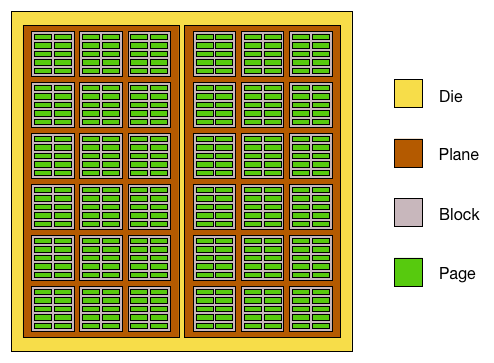
The diagram below shows a simplified view of how flash memory can be organized inside a storage device. It is not necessary for writing the SPI routines, because the SD card controller hides most of these details from the CPU. Still, the terminology is useful because words like page, block, and sector often appear when discussing flash storage.
A page is a small writable unit inside the flash memory. A block is a larger group of pages and is usually the smallest unit that can be erased inside the raw flash array. A plane is a larger region of the die that contains many blocks and can sometimes operate partly independently from other planes.
From the CPU’s point of view, though, an SDHC card presents storage as fixed-size sectors, also called logical blocks. Each sector is 512 bytes. When my assembly code refers to reading a sector, it means reading one of these 512-byte logical blocks through the SD card interface, not directly accessing the raw flash pages in the diagram.
Reading a Block
After initialization, the CPU can read a 512-byte block using CMD17.
After CMD17 succeeds, the card does not immediately send the 512 data bytes. It first sends a data token. For a normal single-block read, that token is 0xFE, which marks the start of the data block. The CPU waits until it sees 0xFE, then reads the next 512 bytes as sector data.
A single-block read looks like this:
send CMD17 with the block address
wait for R1 = 0x00
wait for data token 0xFE
read 512 data bytes
read and discard 2 CRC bytes
For SDHC cards, the address used by CMD17 is a block number rather than a byte address. That is convenient for the CPU because the bootloader can refer to fixed 512-byte blocks on the card.
The bootloader flow uses this idea by placing a small descriptor at one block and the payload at another. The ROM bootstrap can read the descriptor, learn where the payload lives, and then load the payload into RAM.