
 Clock
Clock
 Memory
 Control
SD Bootstrap
The previous pages introduced the SPI bus and the SPI hardware module in my CPU. Now the goal is to use the SD card as external storage and load a program into RAM.
The SD bootstrap is the ROM-resident loader that initializes the SD card, reads a small boot descriptor, copies a stage-2 payload from the card into RAM, and jumps to it.
ROM space is limited, and ROM updates are inconvenient. Before the SD loader, I had to remove the program ROM chip from a cramped part of the build, reprogram it, wait for the programmer to finish, and then plug it back into the board. Over time, repeating this process made me worry about weakening the ROM’s pins.
With the SD bootstrap, the ROM only needs enough code to load programs from the SD card. Larger programs can live on the card and be replaced much more easily. Instead of pulling chips out of the computer, I now just update the SD card from my laptop next to the build and test new programs almost immediately.
Boot ROM Logic
At reset, the CPU begins execution from the boot ROM region. In the current memory map, ROM code starts at 0xC000.
The ROM bootstrap can contain fixed code, but it should avoid hardcoding too much about the stage-2 program. For example, a very simple loader could always do this:
Read SD block 1003.
Copy it to RAM address 0x0200.
Jump to 0x0200.
That works for a first test, but it has an obvious limitation. If the stage-2 program moves to a different SD block, or if it grows beyond one sector, the ROM has to be changed or rebuilt.
The descriptor-based flow is more flexible:
Read descriptor block 1002.
Use the descriptor to find the payload block, load address, and sector count.
Read the payload sector or sectors.
Jump to the loaded program.
The ROM still has one fixed assumption: it knows where to find the descriptor. The descriptor then provides the rest of the boot information.
Raw SD Blocks
For this bootstrap flow, the SD card is treated as raw block storage. There is no filesystem involved.
The card is viewed as a long sequence of 512-byte sectors:
block 0
block 1
block 2
...
block 1002
block 1003
...
The bootstrap code reads sectors by number. For an SDHC card, CMD17 can read one 512-byte block using the block number as the address.
For that reason, the boot flow can say things like:
Read block 1002 into RAM at 0x0400.
Read block 1003 into RAM at 0x0200.
The SD card controller handles the internal flash details. The CPU only sees logical 512-byte blocks.
Descriptor Location
The current development convention is:
SD block 1002: BT1 boot descriptor
SD block 1003: first stage-2 payload sector
SD block 1004: second stage-2 payload sector, if needed
SD block 1005: third stage-2 payload sector, if needed
...
BT1 is the descriptor format used by this bootstrap flow. It is not an SD-card standard or a filesystem format, but a small project-specific record that tells the ROM bootstrap where to find the stage-2 payload.
The name appears directly in the first three bytes of the descriptor:
42 54 31
Those bytes are ASCII:
0x42 = 'B'
0x54 = 'T'
0x31 = '1'
The 1 is the descriptor version.
It lets the ROM check that the sector it read looks like the expected descriptor before trusting the rest of the values.
Block 1002 only contains boot metadata, it does not contain executable code. The payload code starts at the block listed inside the descriptor, normally block 1003.
The descriptor is read into RAM at:
0x0400
Once the 512-byte descriptor sector is in RAM, the ROM bootstrap reads specific bytes from 0x0400 onward and interprets them as fields.
BT1 Descriptor Layout
The descriptor uses one 512-byte SD sector. Only the first 12 bytes are currently meaningful. The rest of the sector is unused and filled with zeros.
| Byte offset | Meaning |
|---|---|
0 | Magic byte 0x42, ASCII B |
1 | Magic byte 0x54, ASCII T |
2 | Version byte 0x31, ASCII 1 |
3 | Flags / reserved |
4 | Payload start block bits [31:24] |
5 | Payload start block bits [23:16] |
6 | Payload start block bits [15:8] |
7 | Payload start block bits [7:0] |
8 | Load address high byte |
9 | Load address low byte |
10 | Sector count high byte |
11 | Sector count low byte |
12..511 | Unused / zero-filled |
Byte 3 is reserved for flags. Right now, my bootloader does not use any flag bits, so the field is set to 0x00. I keep it in the descriptor so future versions can add simple options without changing the layout. For example, a later version could use flag bits to select a load mode, or mark the payload type.
The multi-byte fields are stored big-endian, with the most significant byte first.
A normal one-sector payload setup looks like this:
42 54 31 00 00 00 03 EB 02 00 00 01
Breaking that down:
42 54 31      BT1 signature
00            flags / reserved
00 00 03 EB   payload start block = 1003
02 00         load address = 0x0200
00 01         sector count = 1
If the payload still starts at block 1003 and still loads at 0x0200, but grows to three sectors, only the final field changes:
42 54 31 00 00 00 03 EB 02 00 00 03
So, in short, the bootloader reads a known sector into a known RAM address, then reads fixed offsets from that RAM buffer.
For example, after descriptor block 1002 is copied to 0x0400, the ROM expects:
0x0400..0x0402 = 'B' 'T' '1'
0x0404..0x0407 = payload start block
0x0408..0x0409 = load address
0x040A..0x040B = sector count
So the ROM can do direct memory reads:
Read 0x0404..0x0407 to learn the SD payload block.
Read 0x0408..0x0409 to learn the RAM load address.
Read 0x040A..0x040B to learn how many sectors to copy.
It’s as simple as that. The descriptor sector is just structured data stored at fixed offsets.
Scratch RAM Used by the Bootstrap
The current multi-sector bootstrap uses a small scratch area in RAM to keep track of the load process.
0x0100..0x0103 = current SD block number, big-endian 32-bit
0x0104         = entry / load low byte
0x0105         = entry / load high byte
0x0106         = remaining sector count high byte
0x0107         = remaining sector count low byte
0x0108         = current RAM destination low byte
0x0109         = current RAM destination high byte
0x010A         = debug counter for completed sector reads
The descriptor itself is read to:
0x0400..0x05FF
The usual stage-2 payload load address is:
0x0200
These addresses are development conventions. I chose them because they are easy to inspect and clearly separate from the ROM region.
Reading One SD Block Into RAM
The SD block I/O routine uses CMD17 to read one 512-byte sector.
As a reminder, 0xFE is the data token sent by the SD card after a successful CMD17 command to label the start of a normal single-block read. After the card sends 0xFE, the next 512 bytes are the sector data.
Before the call, the caller sets:
0x0100..0x0103 = SD block number to read
$C = low byte of destination RAM address
$D = high byte of destination RAM address
For example, if the descriptor says the payload starts at block 1003, the 32-bit block value is stored in scratch RAM as 00 00 03 EB.
In hexadecimal, that value is:
0x000003EB
In binary, the same value is:
00000000 00000000 00000011 11101011
Since my CPU moves address-sized values through 16-bit registers, the bootstrap handles the 32-bit SD block number as two 16-bit halves:
upper half = 0x0000 = 00000000 00000000
lower half = 0x03EB = 00000011 11101011
The routine then:
selects the SD card
sends CMD17
sends the 32-bit block address from 0x0100..0x0103
waits for R1 = 0x00
waits for data token 0xFE
copies 512 bytes into RAM starting at $CD
discards the two CRC bytes
deselects the SD card
returns carry clear on success
Current Bootstrap Flow
The current multi-sector flow starts in ROM at 0xC000.
At a high level, it does this:
1. Start at ROM address 0xC000.
2. Initialize the SD card through SPI.
3. Read descriptor block 1002 into RAM at 0x0400.
4. Check that 0x0400..0x0402 contains 'B' 'T' '1'.
5. Copy the descriptor fields into scratch RAM.
6. Make sure the sector count is not zero.
7. Read the requested number of payload sectors into RAM.
8. Jump to the descriptor-provided load address.
The descriptor block number is currently fixed:
1002 decimal = 0x000003EA
So the bootstrap first stores that block number into the working SD block buffer:
0x0100 = 0x00
0x0101 = 0x00
0x0102 = 0x03
0x0103 = 0xEA
Then it sets the destination pointer to 0x0400 and calls the 512-byte block-read routine.
Descriptor Validation
After the descriptor sector is in RAM, the ROM checks the first three bytes.
Expected values:
0x0400 = 0x42
0x0401 = 0x54
0x0402 = 0x31
That is the BT1 signature. If any byte does not match, the bootstrap jumps to its failure path and prevents the ROM from treating random SD-card data as a valid boot descriptor.
Stage-2 Payload Transfer
Once the descriptor is validated, the ROM copies the descriptor fields into scratch RAM.
The payload start block from 0x0404..0x0407 becomes the current SD block number at 0x0100..0x0103.
The load address from 0x0408..0x0409 is stored in two places:
0x0104..0x0105 = preserved entry / load address
0x0108..0x0109 = current destination pointer
The sector count from 0x040A..0x040B is stored at:
0x0106..0x0107
Then the loader enters a loop.
Each loop iteration:
reads one 512-byte sector into the current RAM destination
increments the current SD block number
adds 0x0200 to the RAM destination
decrements the remaining sector count
Adding 0x0200 advances the destination by exactly 512 bytes, because one SD sector is 512 bytes.
When the remaining sector count reaches zero, the payload has been copied into RAM.
Stage-2 Jump
After the payload is loaded, the ROM jumps to the descriptor-provided load address.
The current convention is that the load address is also the entry address. So if the descriptor says:
load address = 0x0200
then the ROM jumps to:
0x0200
At that point, execution leaves the ROM bootstrap and continues from the stage-2 program in RAM.
Debug Display Markers
The bootstrap uses the segmented display for coarse progress markers during bring-up.
In the multi-sector version, the current markers are:
0xA1  bootstrap entered
0xB2  SD initialization completed
0x23  descriptor block read succeeded
0x33  descriptor magic validated
0x44  descriptor fields copied, load phase begins
0x55  all payload sectors loaded
0x99  failure
During the multi-sector load loop, the bootstrap also displays a small counter for completed sector reads. It makes it easier to tell whether the loader is failing before the payload, during the payload copy, or after the payload copy.
Single-Sector Version vs Multi-Sector Version
There are two useful versions of the bootstrap.
The first version is a stricter one-sector loader. It reads the descriptor, but only accepts:
load address = 0x0200
sector count = 1
Then it reads one payload block into RAM at 0x0200 and jumps there. This version is easier to reason about during early bring-up.
The newer version supports the descriptor-provided load address and sector count. It can read multiple contiguous sectors into RAM and then jump to the loaded payload.
For the current project direction, the multi-sector version is the more useful one because larger OLED demos and monitor programs can exceed one 512-byte sector.
Host-Side Deployment Scripts
Two small Python scripts handle the host-computer side of the SD bootstrap flow.
make_bootdesc.py creates a 512-byte BT1 descriptor sector. deploy_asm.py assembles a program with customasm, trims the assembled image from the requested origin, packages the result for ROM or SD use, and can write the SD payload directly to the card.
The examples below show the same flow on Linux and Windows. The device names are from my own test machines, so they should not be copied blindly. Always identify the SD card first and confirm its size before a direct write.
Linux Workflow
On Linux, I compare lsblk output before and after the SD card is attached. The new 29.1G device is the card. In the example below, the external adapter appears as sdb, with the first partition as sdb1.
lsblk
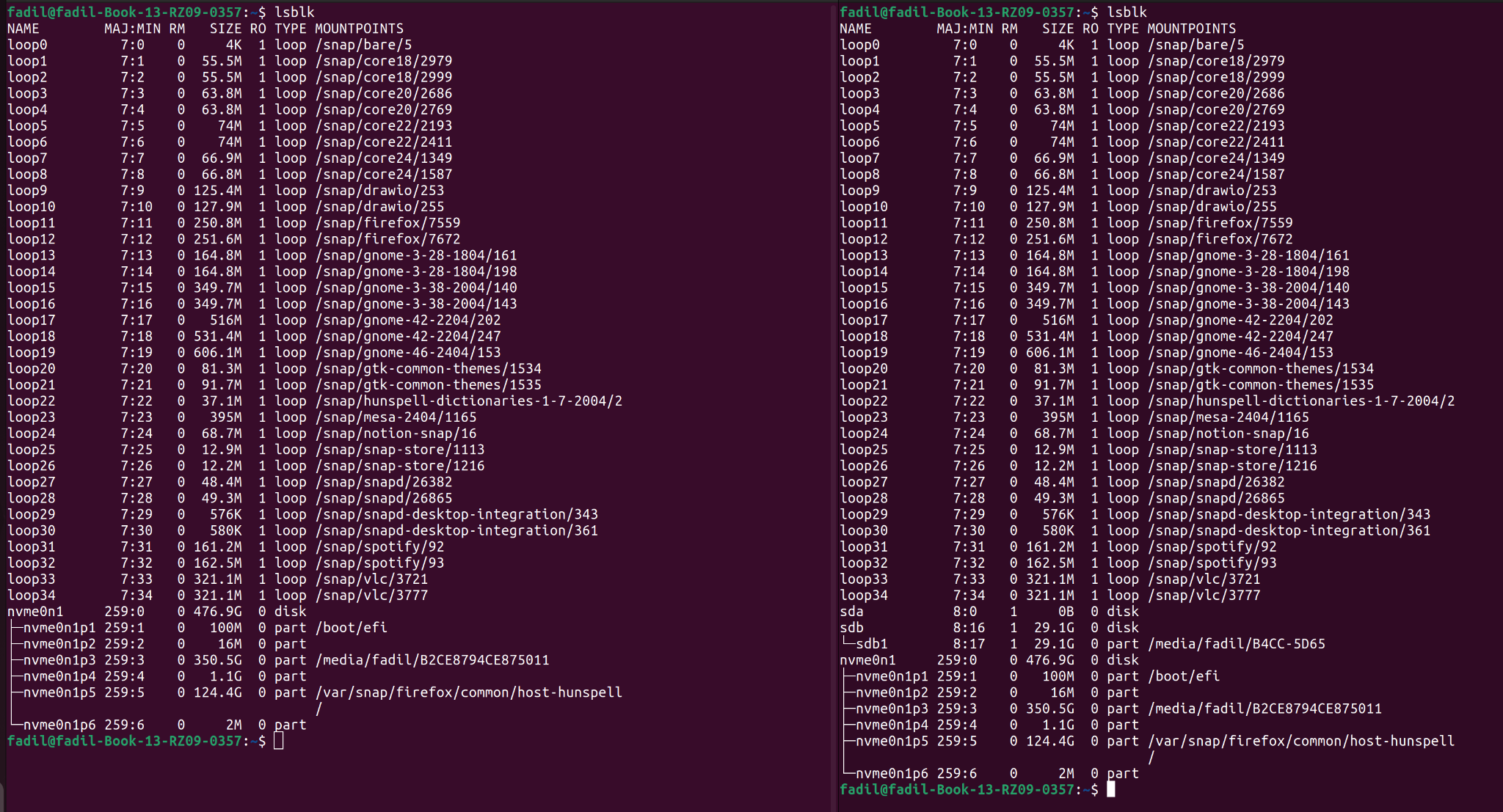
lsblk. The new sdb/sdb1 entry is the SD card in this test.For a raw whole-card layout, the disk node is usually the closer match to the CPU’s view of the SD card. In that case, the device would be:
/dev/sdb
For a partition-relative test, the first partition would look like:
/dev/sdb1
The screenshots in this section use /dev/sdb1 for the Linux test setup shown on my laptop. If the ROM reads whole-card block numbers, use the whole disk device instead and re-check the target carefully.
A descriptor-only write can be done with make_bootdesc.py:
sudo python3 make_bootdesc.py --payload-block 1003 --load-addr 0x0200 --block-count 1 --out bootdesc.bin --device /dev/sdb1 --descriptor-block 1002 --verify-readback
A ROM build does not need SD-card access:
python3 deploy_asm.py rom sd_bootstrap_v2_multi_sector.asm --origin 0xC000 --dump-annotated --out-dir ROM
A direct SD payload write can be done with deploy_asm.py:
sudo env "PATH=$PATH" python3 deploy_asm.py sd test_program.asm --origin 0x0200 --device /dev/sdb1 --block 1003 --descriptor-block 1002 --dump-annotated --out-dir SD
sync
After writing to the SD card, run sync before removing it. I ran into several confusing debug sessions before realizing Linux had not flushed the latest writes to the card yet.
The sudo env "PATH=$PATH" form keeps the normal shell path available to the script. That helps when customasm is available in the user shell but not in root’s default path.
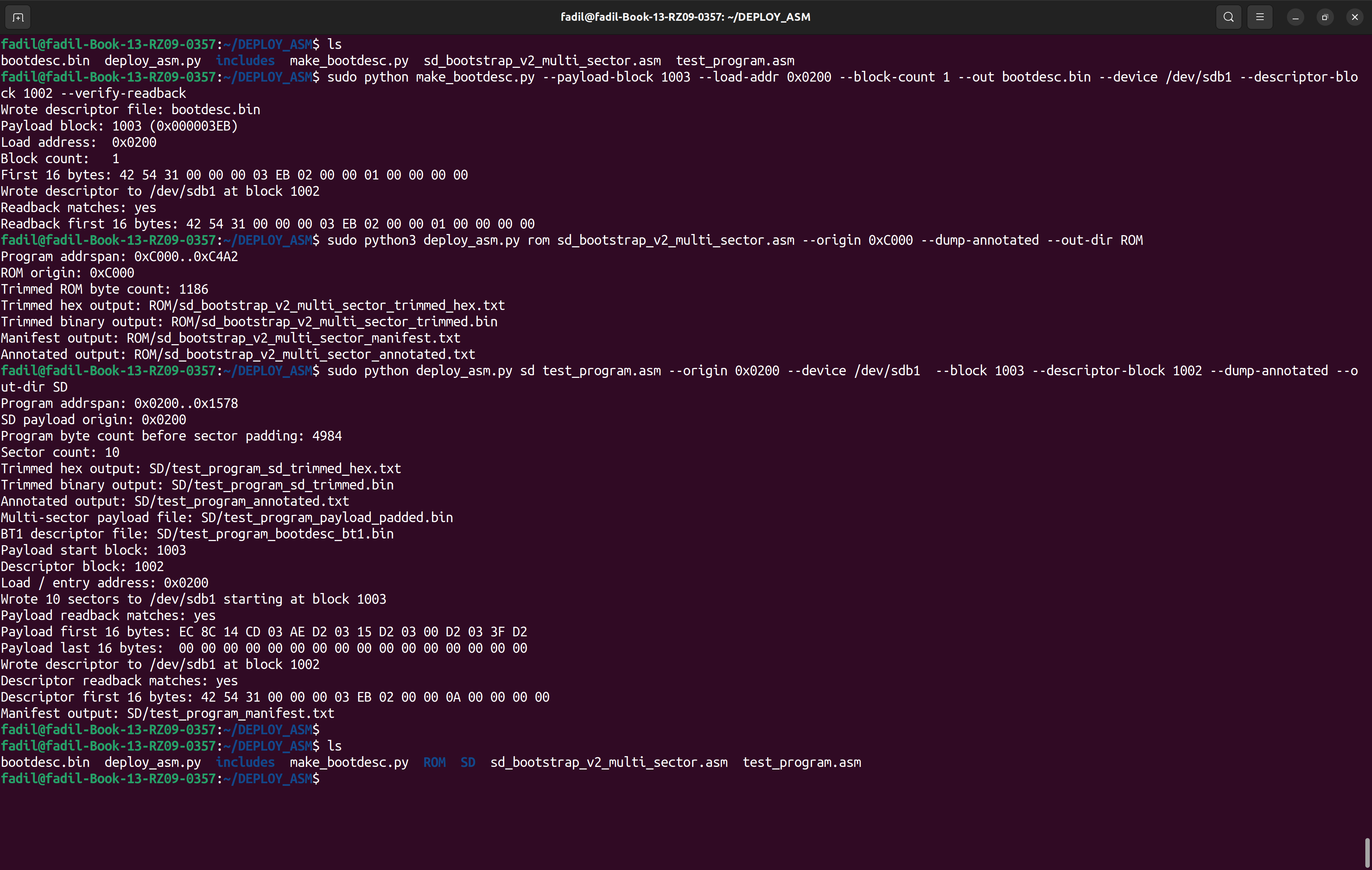
The script checks the trimmed payload size. If the payload fits in one 512-byte sector, the script writes one padded sector at the payload block. In that single-sector path, it does not automatically rewrite the BT1 descriptor.
If the payload is larger than one sector, the script writes a padded multi-sector payload at the payload block, creates a BT1 descriptor, writes the descriptor to the descriptor block, and verifies both with readback checks.

Windows Workflow
Note: Open PowerShell as Administrator before running the Windows SD-card commands. Raw physical-drive access and volume locking usually require elevated permissions.
On Windows, the same SD card appears as a physical disk rather than a /dev/... path. I first run Get-Disk before and after the card appears. In the example below, the SD card is Disk 5, so the raw device path is:
Get-Disk
\\.\PhysicalDrive5
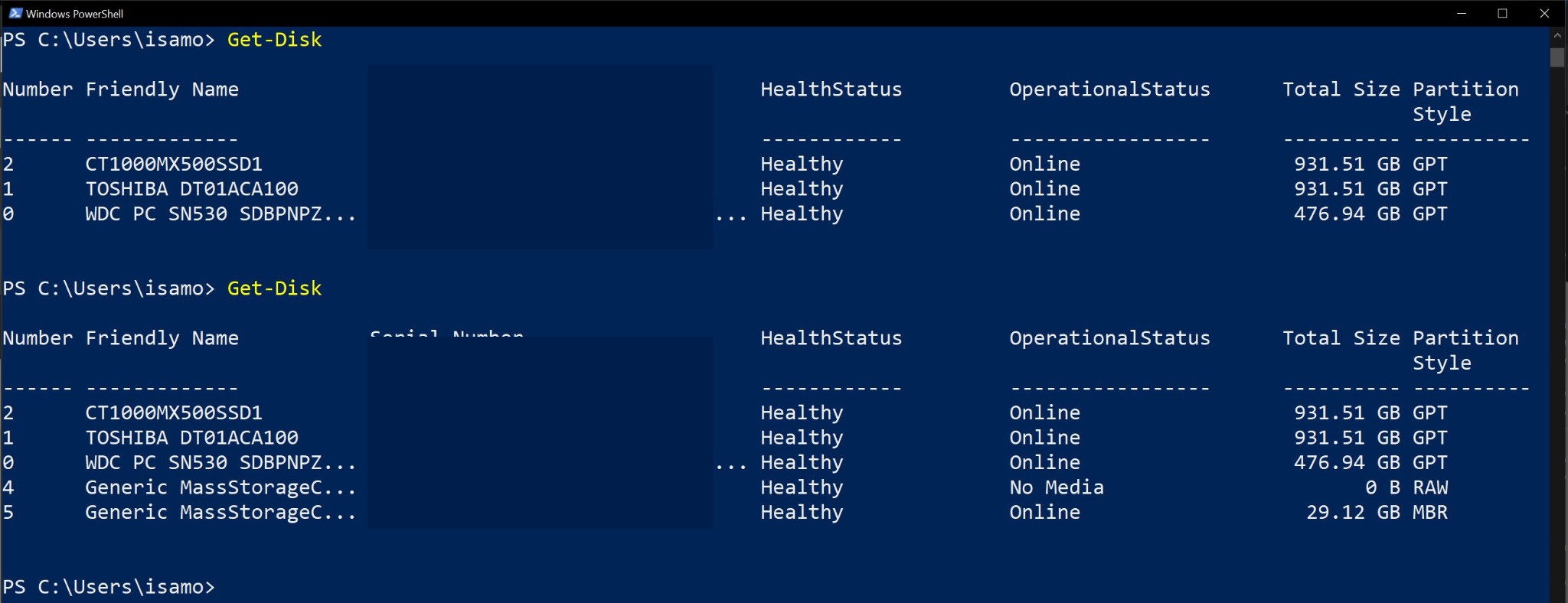
Get-Disk output before and after the SD card appears. The new 29.12 GB disk is PhysicalDrive5 in this test.Windows also needs a volume lock when the script writes to the raw physical drive. I use Get-CimInstance Win32_Volume to find the SD-card volume GUID. The right entry is the FAT32 volume whose capacity matches the card. Run:
Get-CimInstance Win32_Volume |
    Select-Object DriveLetter, Label, FileSystem, Capacity, DeviceID
In my test, the SD-card volume GUID was:
\\?\Volume{2a7913e0-4753-11f1-a6cb-28cdc480a7e2}\
Again, the Windows commands below should be run from Administrator PowerShell. The volume GUID and physical drive number must match the current SD card.
Descriptor-only write:
python make_bootdesc.py --payload-block 1003 --load-addr 0x0200 --block-count 1 --out bootdesc.bin --device "\\.\PhysicalDrive5" --windows-lock-volume "\\?\Volume{2a7913e0-4753-11f1-a6cb-28cdc480a7e2}\" --descriptor-block 1002 --verify-readback
ROM build:
python deploy_asm.py rom sd_bootstrap_v2_multi_sector.asm --origin 0xC000 --dump-annotated --out-dir ROM
Direct SD payload write:
python deploy_asm.py sd test_program.asm --origin 0x0200 --device "\\.\PhysicalDrive5" --windows-lock-volume "\\?\Volume{2a7913e0-4753-11f1-a6cb-28cdc480a7e2}\" --block 1003 --descriptor-block 1002 --dump-annotated --out-dir SD
The Windows output mirrors the Linux flow from writing the descriptor to running the readback check.
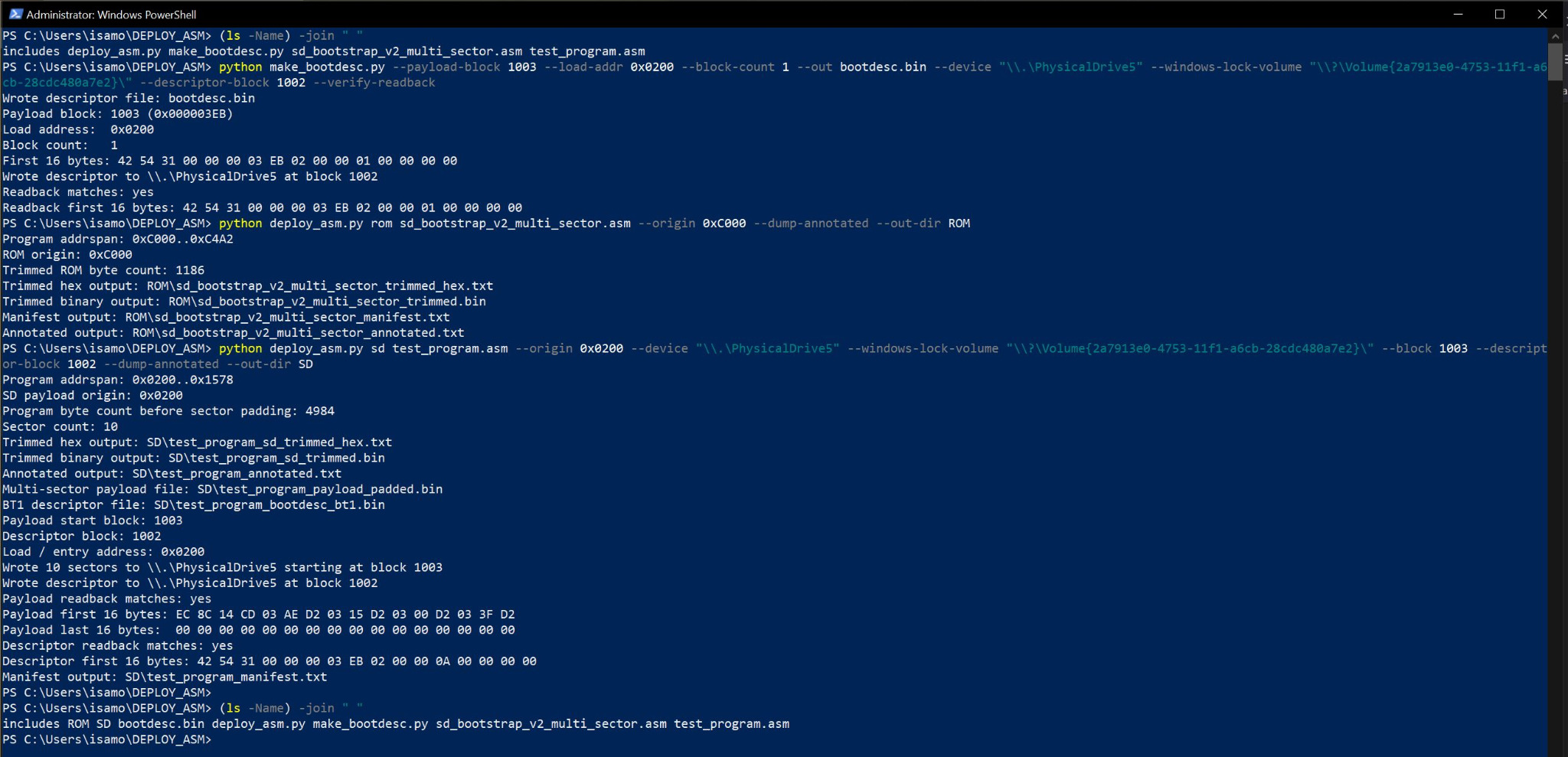
The generated files match the same logical outputs as the Linux run: descriptor file, ROM files, trimmed SD payload, padded payload, generated descriptor, annotated listing, and manifest.

Current Baseline
The current baseline values are:
ROM origin:             0xC000
Descriptor block:       1002
Payload start block:    1003
Payload load address:   0x0200
Descriptor scratch RAM: 0x0400
Sector size:            512 bytes
Descriptor format:      BT1